Enrichment
This article is part of the "Full-cycle CRM Optimization" series.
CRM Enrichment: Enrich To Activate, Not To Accumulate
In the Audit and Data Cleaning steps, you fixed what was broken and restored trust. CRM data enrichment is where you turn a clean database into an actionable one, not by adding data everywhere, but by filling the exact gaps that block segmentation, routing, and outreach.
The goal is never "a richer database." It's a database where every record carries enough context for the next action: score it, route it, contact it.
What you should get at the end (the deliverables):
an Enrichment Scope (what objects + what fields + what sources)
a Field Mapping (which enriched fields land where, naming convention, overwrite rules)
an Activation Plan (what happens when a record is enriched: assignment, workflow, task)
a Refresh Policy (who gets re-enriched, how often, and why)
If those aren't clearly produced, enrichment becomes a one-time data dump that decays within weeks.
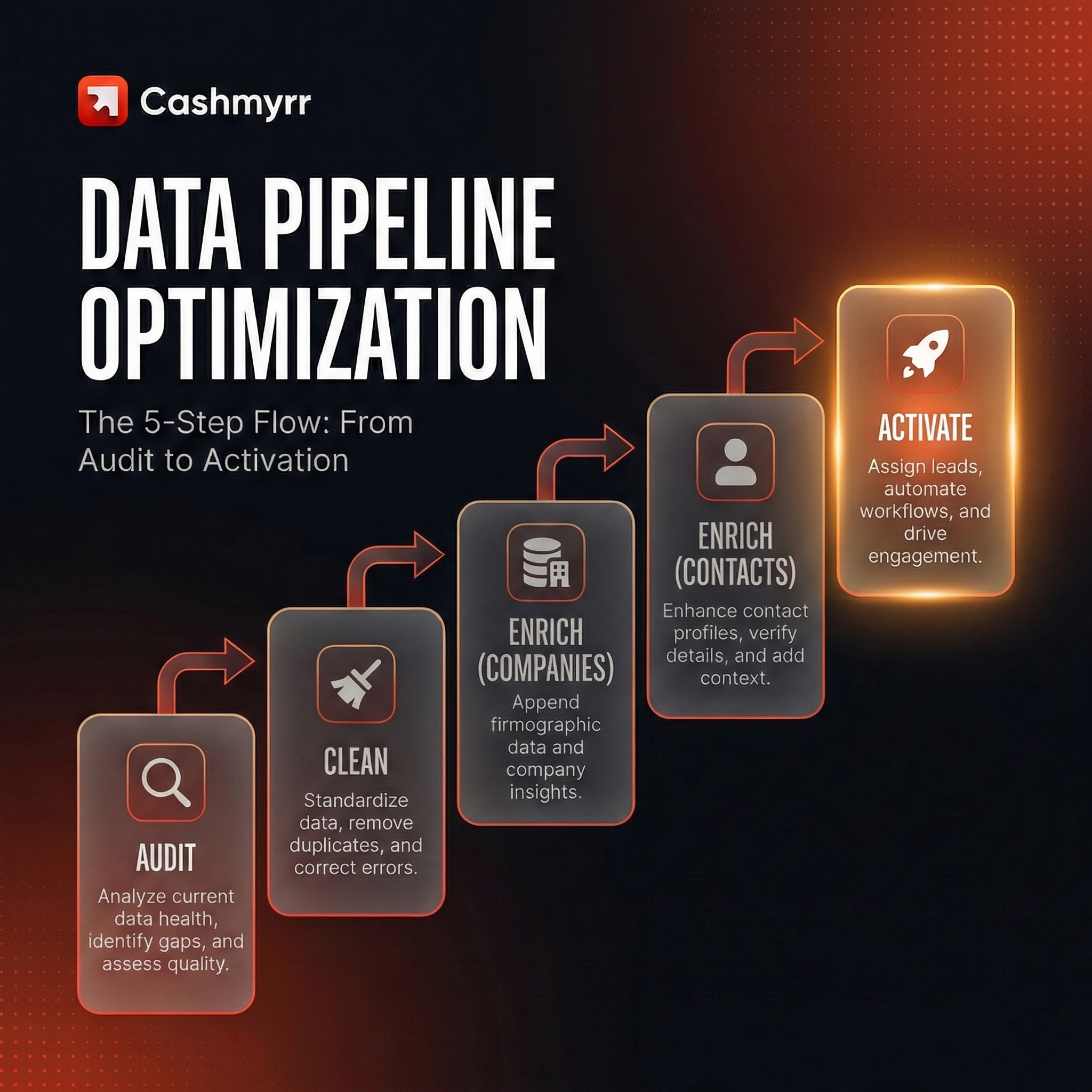
THE STAGES
1. Why enrichment comes after cleaning (and not instead of it)
Enriching a messy CRM database is one of the fastest ways to create new data quality problems. If you push enriched data into a CRM full of duplicates, inconsistent fields, and broken structure, you get:
enriched duplicates (now harder to merge because both records look "complete")
conflicting values (enrichment says "SaaS", the rep typed "Software")
false confidence ("the data looks full, so it must be right")
That's why our RevOps method always sequences Audit → Clean → Enrich. Data enrichment without cleanup is risky. Enrichment on top of a clean, structured CRM base compounds value.
2. Start with company enrichment, then move to contacts
Most teams jump straight to contact enrichment: emails, phone numbers, done. But that's skipping the foundation. The right sequence for CRM data enrichment is:
A) Company scraping/enrichment: build your TAM
Before you enrich contacts, you need to know which companies matter. This means enriching the account-firmografic info with:
domain/website (the unique key for deduplication and matching)
industry/sub-industry (for segmentation and ICP scoring)
size indicators (headcount, revenue range, whatever your scoring model needs)
LinkedIn company URL (for social selling and validation)
geography/HQ location (for territory assignment and routing)
We typically use LinkedIn for company-level enrichment at scale. It covers firmographic data reliably and integrates well with most CRM setups including HubSpot and Salesforce. The key is not which tool you use, it's that you enrich companies before you start pulling contacts, so that every contact lands on a properly segmented, scored account.
LinkedIn is the most up-to-date data provider for tech/large companies. Depending on the TAM we should use other data providers → direct from web search (using LLM), large datasets (exemple with SanteVet and brokers), Google Maps...
Everything is possible, we just need a large and reliable dataset to get relevant data.
B) Contact scraping/enrichment: map the buying committee
Once accounts are enriched, scored, and tiered, you enrich contacts, but not all of them.
The pattern we repeat across client engagements: 3 to 5 contacts per target company, mapped to specific roles that match your sales playbook. Not "everyone at the company." The personas that actually show up in your deal cycle.
For this, we used LinkedIn Sales Navigator for the fresher data. The objective here is to get:
the first name
the last name
the current company
all the experiences
all the history about the contact that will be imported into the CRM
Another point is that using Sales Navigator could help us just get more fresher data, comparing to this Apollo and other providers like Lemlist. They are great tools, but they don't have the fresher data that we can rely on to do the outreach and everything related.
For contact enrichment, we use FullEnrich, which runs a cascading enrichment flow across multiple providers. The cascade logic means: if Provider A doesn't return a valid email or phone, Provider B tries, then Provider C. You get higher coverage without manual provider-switching. This is the same architecture we documented in our HubSpot Enrich Contact tool.
What you typically collect per contact:
professional email (verified)
phone number (when available)
job title/seniority level
LinkedIn profile URL
The "reasonable volume" rule
Enrichment has a cost, not just in credits, but in CRM maintenance. Every contact you add is a record someone needs to keep current. So we scope enrichment to what the team can actually work:
How many accounts can your SDRs realistically touch per week?
How many contacts per account does your outreach sequence need?
What's your enrichment budget (credits/month)?
Start with what's workable. Scale when the process proves itself.
3. Overwrite logic: the part that creates trust or destroys it
Before you push any enriched data into the CRM, you need clear rules. This is where most CRM enrichment projects silently break trust.
The questions to answer before any import:
What is the source of truth per field? (enrichment provider vs CRM vs user-entered)
When do we overwrite? (empty fields only? always? only if confidence score is above X?)
Do we keep history? (store old values in a secondary field or log?)
What happens when enrichment contradicts what a rep entered manually?
Our default approach: enrich into dedicated fields. Let the team validate a sample. Then promote to production fields once the rules are confirmed. This avoids the classic scenario where enrichment silently overwrites a rep's carefully maintained data.
4. Enrichment without activation is just data hoarding
The moment a record is enriched, something should happen. If enriched records just sit in the CRM waiting for someone to notice, you've spent credits for nothing.
The activation patterns we implement most often:
Trigger-based assignment: when a company is enriched and meets Tier 1 criteria → auto-assign to an SDR (round robin or territory-based) → create a task → map contacts.
Weekly enrollment cadence: every Monday, push a batch of newly enriched accounts (~15–20 per SDR) into an outreach sequence. This industrializes prospection without overwhelming the team.
"New enriched company" workflow: a HubSpot workflow (or equivalent) that fires when enrichment is complete. It checks the tier, assigns ownership, triggers contact mapping, and creates the first task. This is the "machine" part of the sales machine.
The key principle: enrichment feeds a system, not a list. The system decides what happens next.
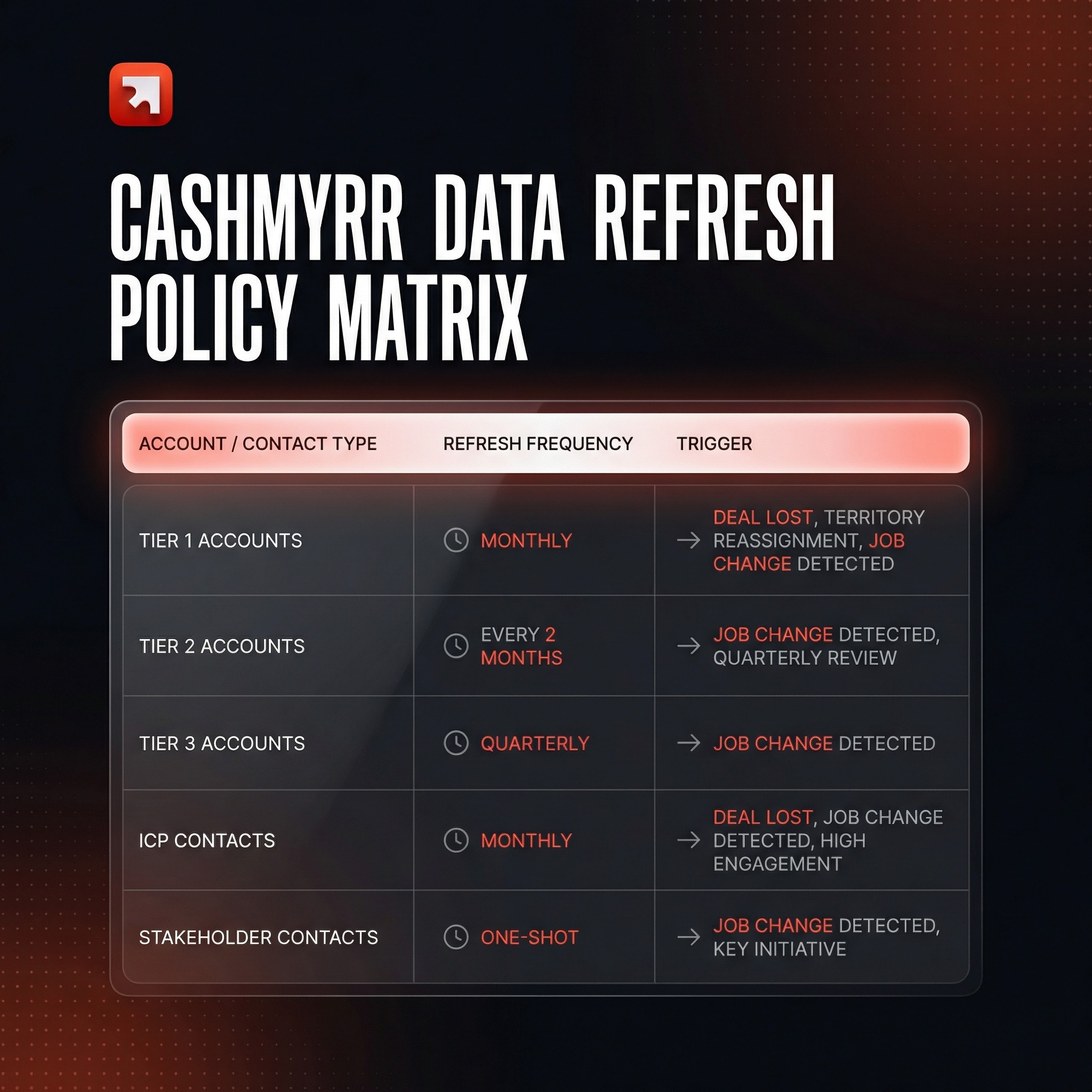
5. Data refresh policy: enrichment is not a one-time project
CRM data decays. People change jobs. Companies pivot.
If you enrich once and never refresh, your database has a shelf life of about 8–12 weeks before accuracy starts dropping noticeably.
A practical data refresh policy by tier:
Tier 1 accounts (assigned, in active prospection or territory): refresh monthly
Tier 2 accounts: refresh every 2 months
Tier 3 accounts: one-shot enrichment, then refresh every 3–4 months
ICP contacts: refresh every 2 months
Stakeholder contacts: refresh every 3–4 months
This isn't "nice to have." It's the difference between a CRM that stays decision-grade and one that slowly becomes a data graveyard again.
Monitoring should track: fill-rate on critical fields, duplicate rate post-enrichment, bounce rate on enriched emails, and data freshness (last enrichment date vs today).
6. What "good" looks like after CRM enrichment
After a well-scoped enrichment:
Your TAM is visible in the CRM: segmented, scored, and tiered.
Every Tier 1 account has 3–5 mapped contacts with verified professional emails.
SDRs receive qualified accounts automatically, with enough context to personalize outreach on day one.
Dashboards reflect reality because the underlying data is both clean and complete.
A refresh cadence is running, so the base doesn't rot.
You're not "enriching a database." You're building the foundation of a sales system that generates pipeline predictably.
Theory is great, execution is better. Hit play to see how we break down the enrichment process with a real example.